
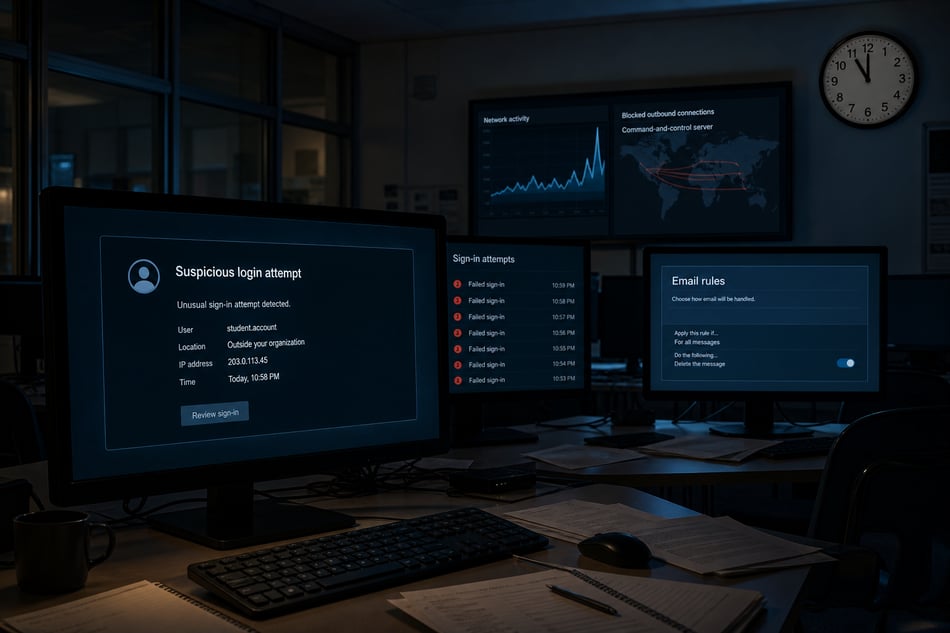
A ransom note is the last thing a school sees, not the first. By the time one appears, the attack has usually been underway for weeks, leaving small signals across email, devices and the network that each looked minor on their own. This post follows one attack through seven stages, using what defenders actually saw at schools in 2025.
The story is a composite. Each stage comes from a real 2025 incident at a different school, with names and identifiers removed. Stages 6 and 7 describe what typically comes next when the earlier stages go unanswered. We did not observe them in these examples.
What are the stages of a school cyberattack?
An attack usually moves through seven stages: reconnaissance, initial access, persistence, discovery, pre-ransomware activity, data theft and impact. Each stage leaves different evidence in a different place, across identity, endpoints and the network. The earlier stages are quiet and cheap to stop. The later ones are loud and expensive.
- Recon: the attacker sets up infrastructure and studies the school
- Access: a staff account is taken over
- Persistence: the attacker hides inside the mailbox
- Discovery: the attacker maps accounts and systems
- Pre-ransomware: tools and privileges are put in place
- Exfiltration: sensitive files leave the network
- Impact: backups go first, then encryption
Why are independent schools worth an attacker's time?
Because schools move money and hold valuable records with few people watching. Tuition, gifts, payroll and vendor invoices move every week. Financial aid files hold family tax data. IT teams are often one to three people, nobody's title says security, and the school calendar announces exactly when no one will be at a desk.
The numbers back this up. Phishing was the top root cause of ransomware attacks on K-12 schools, at 22%, and the average K-12 recovery cost was $2.28 million, not counting any ransom paid, the highest of any sector Sophos surveyed (Sophos). Business email compromise cost U.S. victims close to $2.8 billion in 2024 across 21,442 complaints (FBI IC3, via Nacha). I took on the "they won't pick on schools, we're broke" myth in an earlier post.
How does an attack on a school usually start?
Often with setup the school never sees. At one independent school, a new domain closely resembling the school's name appeared, registered 16 days earlier with the owner hidden. No phishing had been sent yet. Next comes access: a flood of password guesses against staff accounts until one of them works.
Stage 1: A lookalike domain appears
The only evidence was on the network side: a newly observed domain resembling the school's name, a domain age of 16 days, a privacy-protected registrant, and one reputation engine flagging it as suspicious. Nothing showed up in identity or endpoint data. That is what setup looks like.
What a defender could do: confirm whether the school owns the domain. If not, block it at email and DNS, and warn the business office and advancement staff to expect lookalike messages.
Stage 2: An account is taken over
At another school, two IP addresses produced 362 failed sign-ins against staff accounts. Two sign-ins succeeded, both from the same address, and the attacker opened mailbox items right away. This was no longer a test.
What a defender could do: reset the password and revoke active sessions, enforce MFA on the account, check for new inbox rules or forwarding, and look for other accounts touched by the same IP addresses.
How do attackers use a staff mailbox to divert payroll?
They hide the evidence. At a public school district, phishing reached staff inboxes over several days. Then an inbox rule named "." appeared on one account, followed by a sign-in from a blocklisted IP address and a suspicious password change. Days later, a second rule, also named ".", began hiding any email that mentioned "direct deposit."
The goal is simple. If payroll's replies disappear into a folder nobody reads, the attacker can redirect a paycheck, or collect payroll data, before anyone notices. The second rule was created from a commercial VPN address flagged as malicious.
What a defender could do: kill the sessions, delete the rules, and call payroll to freeze any direct-deposit change requested by email. Then search every mailbox for rules with the same name.
How can you tell an attacker's inbox rule from a normal one?
Mostly by context, because staff create rules constantly. At one district, inbox-rule alerts ran to roughly a hundred over the year. Only two were from the attacker. The tells were a blank or one-character name, a rule aimed at payroll language, and creation from a malicious VPN address shortly after a suspicious sign-in.
Real rules from that district show the problem. Most look like this:
- Move all messages from a curriculum vendor to a project folder
- Move all messages from an education platform to Deleted Items
- Move all messages from a recipe newsletter to a personal folder
Two looked like this:
- Rule named ".": if the subject or body contains "direct deposit," move to RSS Feeds
- Rule named ".": move to Conversation History
Most alerts are routine. A few are not. The work is in telling them apart quickly, which usually takes more than one data source.
What happens when attackers move from email into the network?
They go looking for the keys. At a large public district, someone probed for valid account names, guessed passwords against Windows sign-ins, and an internal machine queried the domain controller for accounts and groups. Endpoint protection blocked a staff device's attempt to reach a known command-and-control (C2) server. Blocked is not the same as clean.
Stage 4: Someone maps the network
The identity signals were account enumeration, Kerberos and NTLM password guessing, and LDAP reconnaissance against the domain controller. The endpoint signal was a blocked connection to a C2 server.
What a defender could do: find the internal machine making the LDAP queries and isolate it. Reset any account it touched. Treat the blocked C2 connection as proof that something is already running. A device only tries to reach a C2 server when malicious code on it is calling home for instructions. The block stopped that call, but the code that made it is still on the device and will try again by another route. Find the process behind the connection, remove it, and check other devices for the same traffic.
Stage 5: Ransomware tradecraft
The following week at the same district, a Critical alert fired on an indicator tied to a group Microsoft associates with ransomware. A second C2 connection was blocked the next day, and network traffic reached a ransomware-linked domain. Twice that week, someone modified a decoy admin account that had been set as a trap.
What a defender could do: isolate the affected hosts now, reset privileged credentials, review every admin account, and confirm backups are offline and recoverable before doing anything else.
What happens if no one responds?
The attacker takes the data, then the systems. We did not observe these last two stages in the examples above. They describe what typically follows when earlier signals go unanswered. Files are gathered, compressed and sent out slowly over several nights. Then backups are deleted and encryption runs, often timed for a Friday night before a school break.
Stage 6: The data walks out
The attacker gathers financial aid, HR, student and donor files, compresses them, and sends them to cloud storage, often over several nights to stay under the radar. The signs are an unusual volume of external file sharing, archiving tools running on a file server, large outbound transfers at odd hours, and regular beaconing to the same destination.
This is the last point where a fast response limits the damage. Cut the outbound connection, isolate the source, and start your notification checklist with counsel.
Stage 7: Friday, 11 PM
Backups are deleted or encrypted first. Then encryption runs across servers and staff devices, and a ransom note waits for whoever logs in first. The signs are new admin activity at odd hours, security tools being disabled, mass file changes, and a spike in internal file traffic.
By this point, it's incident response, not detection: your IR plan, your cyber insurance carrier's hotline, counsel, and a recovery partner.
How much does it cost to stop an attack at each stage?
The cost grows at each stage. Blocking a lookalike domain takes minutes. Deleting a mailbox rule and calling payroll takes about an hour. Isolating a compromised machine takes hours. Once data has left, the work is notifying families, which takes weeks. Recovering from encryption takes months.
- Recon: block a domain. Minutes.
- Access: reset and revoke. Minutes.
- Persistence: delete rules, call payroll. An hour.
- Discovery: isolate a machine. Hours.
- Pre-ransomware: isolate hosts, reset admins. A weekend.
- Exfiltration: notify families. Weeks.
- Impact: rebuild and recover. Months.
Remember that this story is a composite. Each stage happened at a different school, and each was flagged there as its own finding. No single school went through all seven stages. The point of stringing them together is that no single signal was conclusive on its own. Read together, and in time, they would have been.
What should an incident report tell a head of school?
Four things: what happened, who and what is affected, why it matters, and what to do next. A raw alert gives none of that. The alert says a rule named "." was created from an IP address. A useful report says payroll emails are being hidden on a staff mailbox, likely to divert a paycheck, and lists the steps to take.
For the payroll rule above, that report would read roughly like this:
- What happened: someone created a hidden mailbox rule from a malicious VPN address.
- Who and what is affected: one staff mailbox confirmed, one related mailbox under review. Payroll communications are the target.
- Why it matters: the rule matches one created on another account five days earlier. This is consistent with an attacker hiding replies while redirecting a paycheck.
- What to do next: revoke sessions and reset the password, delete the rule, tell payroll to hold direct-deposit changes requested by email, and search all mailboxes for rules named ".".
The questions your head of school will ask
- Are we still at risk? Containment status, and what is still being watched.
- Did money or data leave? Which accounts, which records, which payments.
- Who do we have to tell? Families, staff, the insurer, regulators. It depends on state law and contracts, so ask counsel.
- What will this cost? Recovery versus prevention, framed per student.
Before you need any of this, know who your counsel is and read your cyber insurance policy. Many policies require a call to the carrier's hotline before you engage anyone else.
Is this attack pattern unique to schools?
No. The same sequence shows up at mid-market companies, banks, manufacturers and nonprofits. Swap tuition for customer invoices and financial aid files for customer or employee records, and the stages barely change: a lookalike domain, a taken-over mailbox, a hidden rule, quiet discovery, then data theft and encryption.
What schools add is a public calendar and very lean IT staffing, which make the gaps easier to find. The business email compromise losses cited above came from organizations of every kind, not just schools. Any organization whose detection depends on someone sitting at a desk has the same exposure on a Friday night.
What should a lean IT team ask itself this week?
The useful question is whether detection and response depend on someone sitting at a desk. These six questions test that, and most can be answered in one conversation between IT and the business office. None of them requires a new product to answer.
- Do the business office, advancement staff and every admin use phishing-resistant MFA, and is legacy authentication turned off?
- Would anyone be alerted to a new mailbox rule or forwarding, especially one with a blank or one-character name?
- Is EDR on every staff device and server, and does someone act on what it blocks?
- Are backups offline or immutable, and have we restored from them this term?
- Is there a one-page incident plan with names, phone numbers, the insurer's hotline and counsel?
- Who reads identity, endpoint and network signals together at night and over breaks?
Where does Gradient Cyber fit?
Gradient Cyber provides MXDR on Quorum AI, our AI-native platform, for schools and other organizations with lean IT teams. We read three lanes together: Microsoft 365 and Google Workspace by direct API, the EDR you already run, and network telemetry that sees devices with no agent. Our SOC analysts work around the clock alongside the platform.
Each validated finding becomes a SitRep that covers what happened, what is affected, why it matters and what to do next. Response runs through tools you already own, including your EDR, firewall, Entra ID and Active Directory. Pre-approved actions are automated; the rest are analyst-driven. We also learn your school's staff, policies and normal patterns, so the questions we ask are the right ones. We do not replace your EDR or firewall.
For a quick read on your own coverage, the After-Hours Test is ten questions and takes about ten minutes.
This post is adapted from my ATLIS webinar, Anatomy of a School Cyberattack. Watch the full recording.
Frequently asked questions
Is a new inbox rule on its own a sign of compromise?
No. Staff create inbox rules all the time. What matters is context: the rule's name, what it targets, where it was created from, and what happened to the account just before. A blank or one-character name aimed at payroll language, created right after a suspicious sign-in, deserves immediate attention.
What should a school do first after a staff account is taken over?
Reset the password, revoke active sessions and enforce MFA. Then check the mailbox for new rules or forwarding, and look for other accounts touched by the same IP addresses. If the account belongs to anyone near payroll or vendor payments, call the business office right away.
Who does a school have to notify after a data breach?
It depends on state law, your contracts and what data was involved. Families, staff, your insurer and regulators may all be on the list. Ask counsel, and check whether your cyber insurance policy requires a call to the carrier's hotline first.
How many security alerts at a school actually need action?
Few. Most alerts are routine, such as a staff member filing a vendor's emails or a known device checking in. The work is spotting the handful that are not, which usually means reading identity, endpoint and network signals together rather than one at a time.
The earlier someone reads the signals together, the cheaper the attack is to stop.